Installation for Users
This section explains how to install the ETA Utility Functions for usage only. For instructions what to consider during the installation process if you want to contribute to development of the utility functions, please see the development guide Installation and Guide for Developers.
You can install the basic package (without eta_x) or the entire library, both options are shown below.
Creating a virtual environment (recommended)
A virtual environment is a Python environment which isolates its Python interpreter, libraries, and scripts installed. It’s isolated from other virtual environments, and (by default) from any libraries installed in the “system” Python (the main Python environment installed on your operating system). This isolation prevents conflicting libraries or versions from affecting each other.
In order to use a virtual environment, it must first be created in an arbitrary directory on the computer. Open a terminal (for example cmd or PowerShell on Windows) and execute the following commands.
$ python -m venv <Any folder>/.venv
Navigate to your chosen directory, then activate the virtual environment:
$ .venv/scripts/activate
The creation and activation of the environment are shown in the following figure.
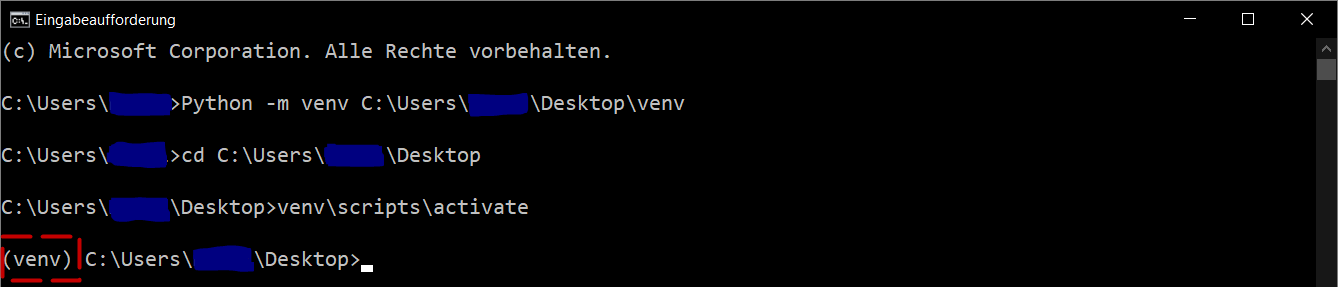
Create and activate virtual environment.
When the virtual environment is activated, (.venv) is prefixed to the console line. The commands in the following chapters can be executed in the virtual environment without any adjustments.
Note
Some IDEs (Integrated Development Environments) such as PyCharm or code editors like VS Code will automate the activation of the virtual environment for you.
Installation via pip
You can install eta_nexus using pip:
$ pip install eta_nexus
It’s recommended to install the package in a virtual environment. See Creating a virtual environment (recommended)
Note
eta-nexus supports Python versions between 3.9 and 3.11 (inclusive).
There are multiple classes of optional requirements. If you would like to use some of the optional components, please install one or more of the following:
examples: Dependencies required to run the examples
develop: All of the above and additional dependencies for the continuous integration processes. Required when performing development work on eta_nexus.
The optional requirements can be installed using pip. For example:
$ pip install eta_nexus[develop]